
In this article (10 sections)1,187 words
- A Piece of A4 Paper From a Partner Clinic
- Why Great Clinicians Still Prefer Paper Over Legacy PMS
- The Hidden Cost of the “Photocopy Archive”
- 1. 15 Minutes of Chairside Drawing & Manual Fee Math
- 2. The “6 Months Later” Photocopy Guessing Game
- 3. Zero Connection to Clinical Execution
- Do You Really Need a Dedicated Treatment Coordinator?
- Old Way vs. New Way: Replacing the Photocopier With a Visual Solution Canvas
- Look, This Isn’t a Sales Pitch
- What Comes Next: What If You Didn’t Even Have to Drag and Drop?
A Piece of A4 Paper From a Partner Clinic
Not long ago, one of our partner dentists handed me a physical sheet of A4 paper from a real patient consultation.
Printed across the top half was a grayscale copy of the patient’s panoramic radiograph. Across the teeth and margins, the dentist had used several different colored pens—red, blue, and black—to circle failing roots, sketch implant fixtures, and draw bridge spans directly over the X-ray.
Below the panoramic, written by hand, were multiple treatment options:
- Plan A vs. Plan B: Different restorative procedures, different prosthetic materials (e.g., Zirconia vs. PFM, implant vs. fixed bridge), and their corresponding fee breakdowns.
- Two physical signatures at the bottom: Signed by both the dentist and the patient.
Before the patient walked out of the clinic with that A4 sheet in hand, the front desk walked over to the office photocopier, made a duplicate copy, and filed it inside a clinic storage folder.
Why? Because when that patient calls back three or six months later saying, “I’m ready to start the treatment we talked about,” the dentist and the treatment coordinator need to pull that photocopy to remember what options, materials, and fees were actually promised at chairside.
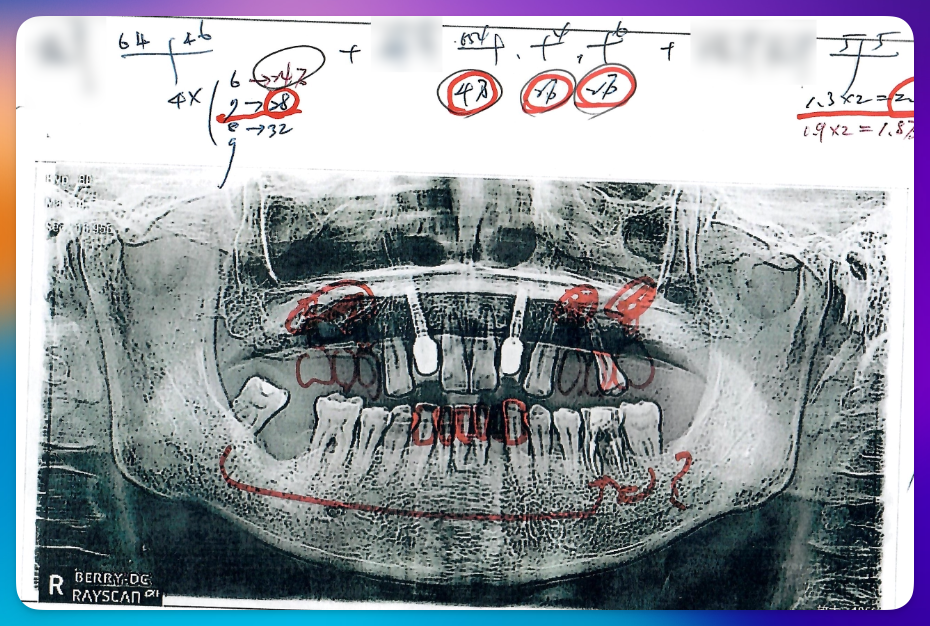
Figure 1: Authentic operatory record — A4 panoramic printout, hand-drawn tooth sketches in multi-color ink, Plan A vs. Plan B material fees, and patient/doctor signatures.
When I looked at that sheet of paper, one realization hit immediately: this clinic already pays thousands of dollars a year for Practice Management Software (PMS). Yet for their highest-value restorative consultations, the doctor still trusts an A4 printout, a four-color ballpoint pen, and a Xerox machine.
Why Great Clinicians Still Prefer Paper Over Legacy PMS
If you ask a practicing dentist why they draw on printed panoramic X-rays instead of relying solely on the native “Treatment Plan Estimate” from their PMS, it helps to look at how traditional dental software prints a plan:
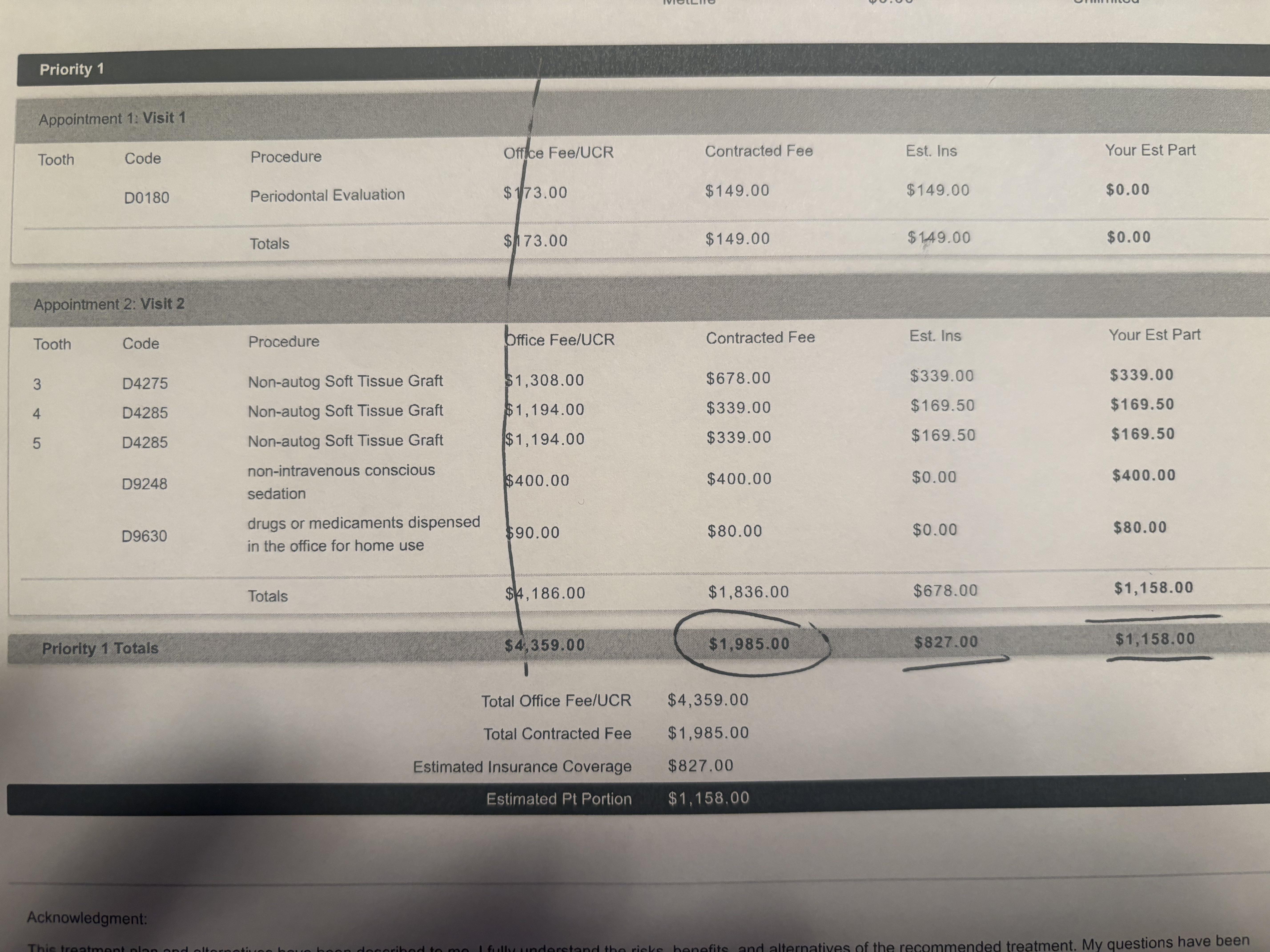
Standard PMS treatment estimate: raw CDT codes and billing lines.
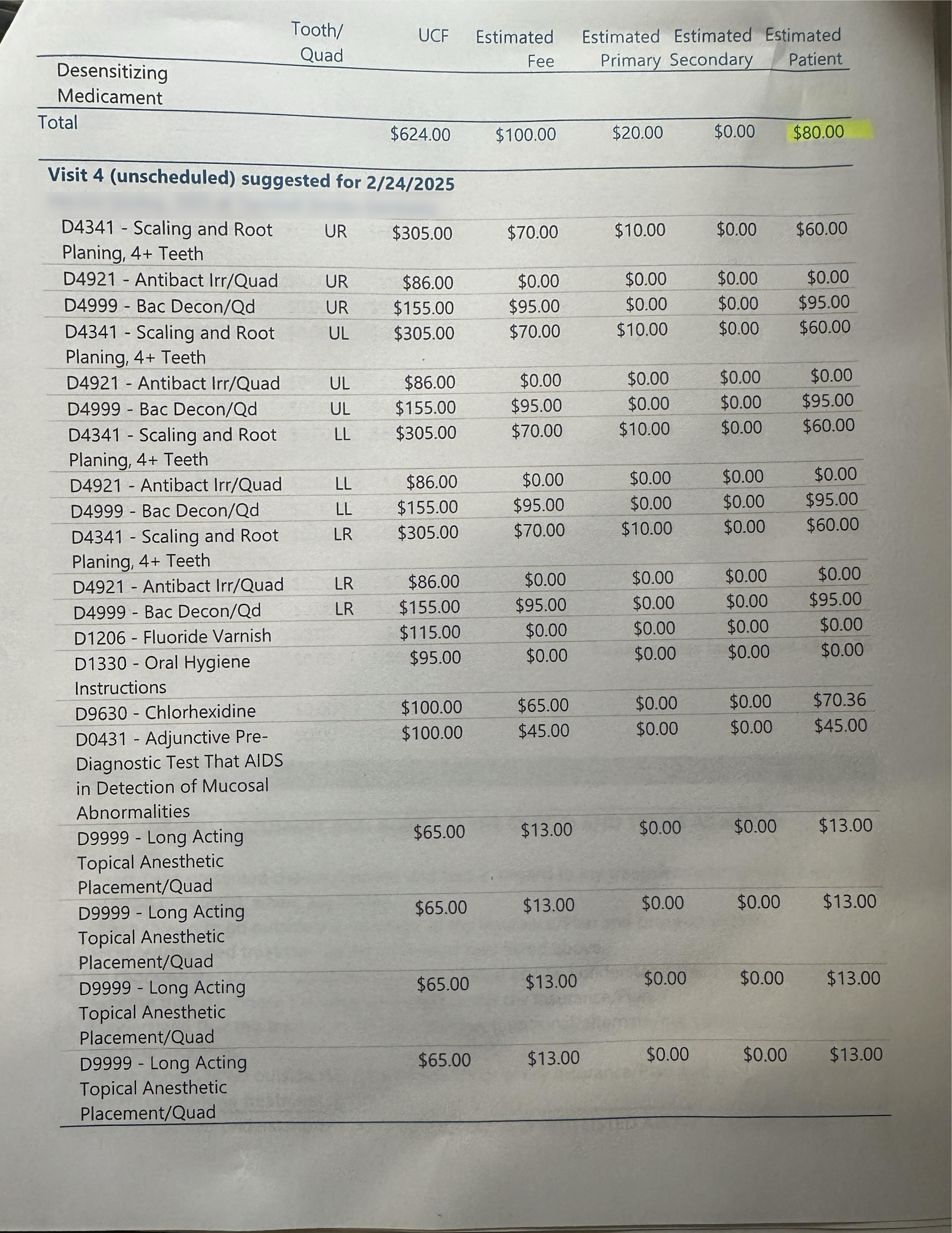
Limited procedure descriptions with fee breakdowns that confuse patients.
To be completely fair, there is nothing inherently wrong with the traditional CDT code table. For decades, this spreadsheet format worked perfectly well for its original purpose: standardizing insurance billing, tracking clinic accounting, and recording procedure fees cleanly.
However, a format designed for insurance clearinghouses is not how modern patients make healthcare decisions.
In the next generation of clinical workflows, we have a much more efficient way to bridge the gap between billing codes and patient understanding: attaching clear, visual procedure explanations directly to every CDT treatment item. When a patient can immediately see and understand what each procedure code actually means for their health, hesitation disappears—resulting in a significantly higher case acceptance and transaction success rate:
Built for Insurance & Accounting
Works reliably for back-office billing, but patients do not know what “Tooth #19 D6010 Endosteal Implant + D6057 Custom Abutment” means. Without visual context, patients experience cognitive overload and default to saying, “Let me think about it.”
Visual Anatomy + Side-by-Side Choices
With colored pens on a panoramic printout, the doctor connects the visual problem (the dark infection at the root tip) directly to the solution, and lays out clear choices (Material A vs. Material B) in under two minutes.
The dentist isn’t using A4 paper because they dislike technology. They are using A4 paper because drawing by hand was the fastest way they could explain clinical reality visually and offer flexible material/cost options side by side.
The Hidden Cost of the “Photocopy Archive”
While the A4 panoramic and colored-pen workflow helps explain the case in the moment, it creates three painful operational bottlenecks inside the clinic:
1. 15 Minutes of Chairside Drawing & Manual Fee Math
Every time a complex case sits in the chair, the doctor has to manually sketch teeth, write out procedure steps from scratch, and calculate fee variations for different materials (e.g., titanium vs. zirconia abutment, different implant brands, or bone graft options) by hand.
2. The “6 Months Later” Photocopy Guessing Game
When a patient takes the original A4 sheet home and calls back four months later ready to proceed, the front desk has to hunt down the clinic’s photocopy or scanned PDF. Often, the handwritten notes in the margin are abbreviated, the specific material brand or shade wasn’t logged into the digital chart, and the treatment coordinator has to interrupt the doctor mid-procedure to ask: “What exactly did we quote on #14 and #15?”
3. Zero Connection to Clinical Execution
A photocopy in a filing cabinet cannot trigger follow-up reminders, cannot link directly to exact dental product/material specifications, and cannot adapt dynamically if the clinical plan changes during Phase 1 surgery.
Do You Really Need a Dedicated Treatment Coordinator?
When we investigated how dental clinics around the world actually present complex restorative and implant cases, one data point stood out immediately: most dental practices do not have a full-time, dedicated Treatment Coordinator (TC).
Global Dental Clinic Investigation: Dedicated Treatment Coordinator Adoption
Estimated percentage of dental practices employing a full-time dedicated Treatment Coordinator across global regions
In the United States and Canada, only 20% to 30% of dental clinics employ a full-time, dedicated Treatment Coordinator—primarily concentrated in DSOs, multi-doctor group practices, and high-volume implant centers.
The remaining 70%+ of solo and small group practices rely directly on the treating dentist or front-desk office manager to explain clinical options and close treatment plans.
Old Way vs. New Way: Replacing the Photocopier With a Visual Solution Canvas
What if clinicians and treatment coordinators could keep the intuitive speed and visual clarity of sketching on an A4 panoramic—without handwriting, manual math, or paper photocopies?
| Workflow Dimension | Legacy PMS Ledger | A4 Copy + Colored Pens | OriginTechX Solution Studio |
|---|---|---|---|
| Visual Clarity | Cryptic CDT code table | Hand-drawn ink lines over paper X-ray | Interactive visual clinical roadmap |
| Multi-Option Plans | Clunky duplicate printed estimates | Handwritten Plan A / Plan B in margins | Drag-and-drop procedures, materials & fee tiers |
| Clinic Storage & Recall | Buried in unranked accounting ledger | Photocopy stored in physical paper folder | Versioned cloud record linked to patient chart |
| Patient Delivery | Printed accounting invoice | Folded A4 paper copy (frequently lost) | 1-click digital share to patient device / PDF |
Look, This Isn’t a Sales Pitch
I didn’t write this article to sell you on abandoning your favorite multi-color ballpoint pen—honestly, if sketching on an A4 copy works for your chairside rhythm, keep doing it!
The only reason we built Solution Studio in the first place was because we watched too many exhausted doctors and treatment coordinators spend 15 minutes drawing teeth, doing manual fee math on scrap paper, and hunting down six-month-old Xerox copies in filing cabinets.
All it really does is give you an interactive canvas to drag and drop procedures, attach plain-English explanations to scary CDT codes so patients actually understand what they’re paying for, and save a digital copy that won’t mysteriously vanish into a paper drawer. That’s it. Nothing complicated.
What Comes Next: What If You Didn’t Even Have to Drag and Drop?
Moving from colored pens on an A4 photocopy to an interactive drag-and-drop canvas eliminates paper clutter and transforms how patients understand their care.
But we asked ourselves an even bigger question:
Even with the best drag-and-drop canvas in the world, a busy dentist still has to spend several minutes assembling the initial procedures and phases. What if the AI could analyze the clinical findings and generate the draft treatment plan automatically—so the dentist only needs to verify it, adjust a procedure or two, and import it into Solution Studio with a single click?
In Part 2, we will go inside our R&D lab to look at AI-Driven Treatment Synthesis—and how moving beyond X-ray bounding boxes changes chairside treatment planning forever, so stay tuned ❤️

Founder at OriginTechX