
In this article (10 sections)1,582 words
- Diagnosis Is Only Half the Battle
- The Generation 1 AI Ceiling: A Bounding Box Is Not a Treatment Plan
- Built on Clinical Depth: Teaching AI to Reason Like a Dentist
- 1. A Foundation of 20,000+ Annotated Radiographs
- 2. Encoding How a Clinician Actually Thinks
- 3. Automatic ICD-10 & CDT Procedure Code Mapping
- AI Drafts, The Dentist Decides—And the Treatment Coordinator Closes
- Inside the Live Workflow: Watch It in Action
- How the Workflow Evolves: Three Eras of Treatment Planning
- From Concept to Chairside Reality
Diagnosis Is Only Half the Battle
In Part 1 of this series, we looked at a scene that happens in thousands of dental clinics every day: a dentist printing a patient’s panoramic X-ray on A4 paper, grabbing four colored pens, and hand-writing multiple treatment and material options because legacy Practice Management Software (PMS) makes visual treatment presentation so painful.
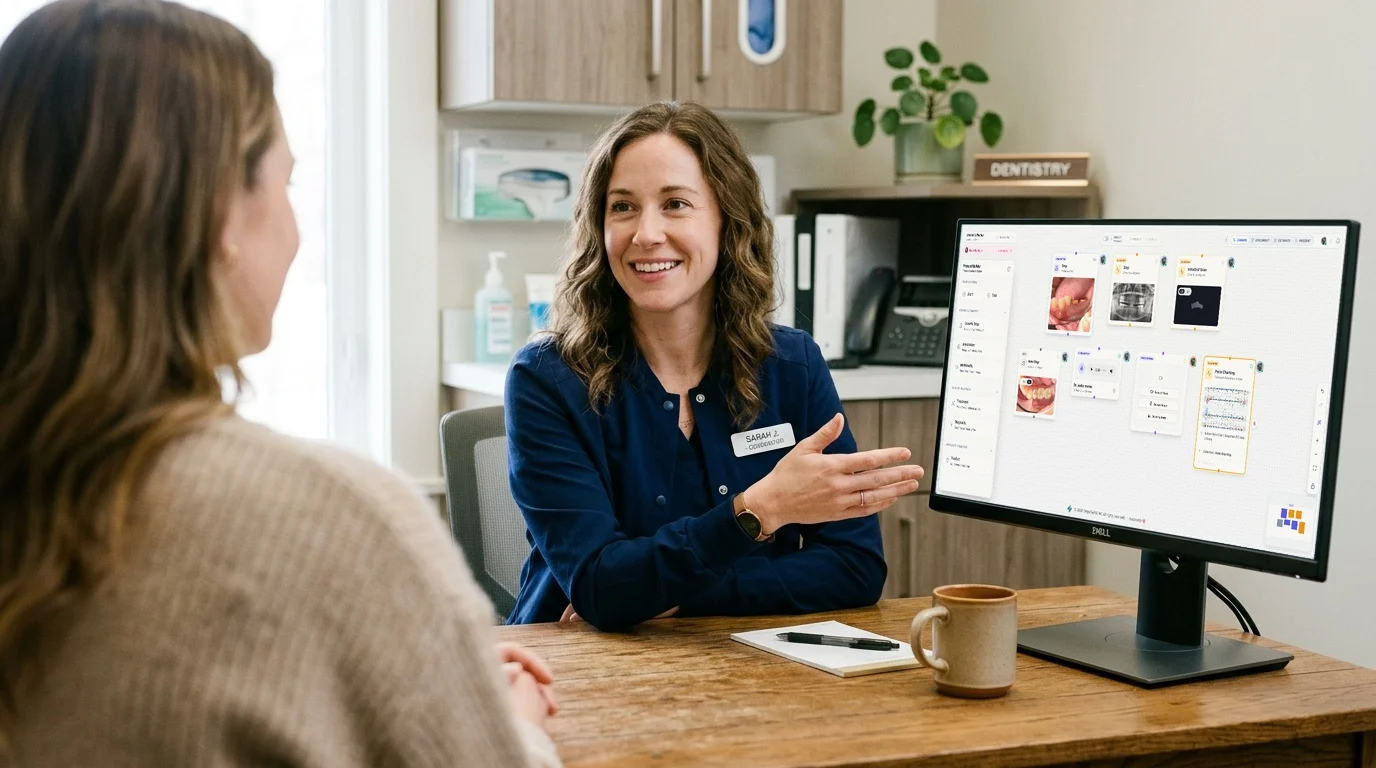
By replacing that A4 photocopy with Solution Studio, clinicians and Treatment Coordinators (TCs) can visually drag and drop procedures, attach plain-English explanations to CDT codes, and present clear cost tiers on an interactive patient roadmap.
Working closely with our clinic partners—both dentists and treatment coordinators—since 2016, we have seen firsthand how a clinician and coordinator actually think through a complex case at chairside:
“Look at this patient’s arch—can we still save these compromised teeth, or is the bone loss too advanced? Given their past dental history, should we propose an All-on-4 full-arch restoration, stage single implants over two phases, or give them a fixed bridge or removable denture option? And realistically—what does their financial budget look like so we can present a Plan A and Plan B they can actually afford and accept today?”
That is how real dentists and treatment coordinators think. They are never just matching one X-ray shadow to a single billing code—and as we watched clinics work through these decisions in real operatories, a deeper bottleneck became obvious:
Identifying pathology on an X-ray takes a trained dentist 30 seconds. Translating those findings into a sequenced, multi-option treatment plan—complete with surgical phases, restorative materials, and alternatives—still takes 10 to 15 minutes of manual assembly.
And this raises a fundamental question about the state of artificial intelligence in dentistry today: Why does “Dental AI” stop the moment it draws a box on an X-ray?
The Generation 1 AI Ceiling: A Bounding Box Is Not a Treatment Plan
Over the last few years, nearly every commercial dental AI product on the market has focused on the exact same task: 2D pixel detection.
The algorithm scans a bitewing or panoramic radiograph and draws colored boxes around suspected caries, periapical radiolucencies, calculus, or bone levels.
While visual detection is a helpful second pair of eyes, any practicing dentist knows that spotting a finding is the easiest part of the appointment. The real cognitive and operational workload happens after diagnosis:
“There Is a Shadow on Tooth #19”
Stops at pixel detection. Leaves the doctor and assistant to manually build every phase of the treatment plan, select procedures and materials, and organize the clinical sequence from scratch.
“Here Are the Draft Clinical Options—Ready for Doctor Verification”
Bridges radiographic findings and anatomical context into a structured draft treatment plan—proposing sequenced procedures and restorative pathways that the dentist can verify in 10 seconds and hand off to the Treatment Coordinator in one click.
Built on Clinical Depth: Teaching AI to Reason Like a Dentist
Why hasn’t standard AI been able to build real dental treatment plans until now? Because you cannot generate a safe, realistic treatment plan by simply feeding an X-ray into a generic chatbot.
When a dentist looks at a radiograph, they aren’t just looking at isolated spots—they are evaluating the entire structural foundation of the mouth. To build an AI assistant that drafts clinically sound treatment plans, we had to start with deep, domain-specific clinical training:
1. A Foundation of 20,000+ Annotated Radiographs
Our pre-trained clinical vision engine was built on over 20,000 clinically annotated panoramic and periapical radiographs. Rather than looking for single isolated anomalies, the model simultaneously identifies six core categories of radiographic findings:
| Finding Category | What Our Pre-Trained Module Detects | Clinical Role in Treatment Synthesis |
|---|---|---|
| 1. Arch & Tooth Position | Upper jaw (maxilla), lower jaw (mandible), and exact tooth position (#1–#32 / FDI) | Maps full-arch spatial layout and multi-quadrant relationships |
| 2. Tooth Pulp & Root Canal | Tooth pulp chamber anatomy, deep caries reaching the pulp, and existing root canal fillings | Identifies whether a tooth needs Root Canal Therapy (RCT) or endodontic retreatment |
| 3. Crown & Restorations | Natural tooth crown structure, prosthetic crowns, bridges, fillings, and existing implants | Evaluates coronal integrity and whether a new full-coverage crown or replacement is needed |
| 4. Missing & Impacted Teeth | Edentulous spaces, missing tooth positions, and impacted/unerupted teeth | Triggers prosthetic replacement options (e.g., Implant + Crown vs. Fixed Bridge) |
| 5. Radiographic Bone Loss (RBL) | Horizontal and vertical periodontal bone loss levels across the upper and lower jaws | Assesses periodontal support and determines if bone grafting or sinus lift is required |
| 6. Periapical & Dental Diseases | Caries lesions, periapical radiolucencies (apical infection/abscess), and root resorption | Guides the clinical choice between restorative/endodontic preservation vs. extraction |
2. Encoding How a Clinician Actually Thinks
Once the anatomical and pathological reality is mapped, our clinical synthesis engine applies dental treatment reasoning—mirroring the decision tree a doctor runs through at chairside.
Take a classic everyday example: The engine detects that Tooth #13 is missing.
Instead of simply flagging “Tooth #13 Missing,” the system evaluates the surrounding RBL (bone level) and the condition of the adjacent teeth (#12 and #14) to draft practical restorative pathways:
- Option A (Implant Pathway): Single endosteal implant at
#13+ custom abutment + zirconia crown (automatically factoring in a bone graft / sinus lift phase if the radiographic analysis shows insufficient bone height). - Option B (Fixed Bridge Pathway): 3-unit fixed bridge spanning
#12–#14, allowing the dentist and patient to compare a non-implant surgical alternative side by side.
3. Automatic ICD-10 & CDT Procedure Code Mapping
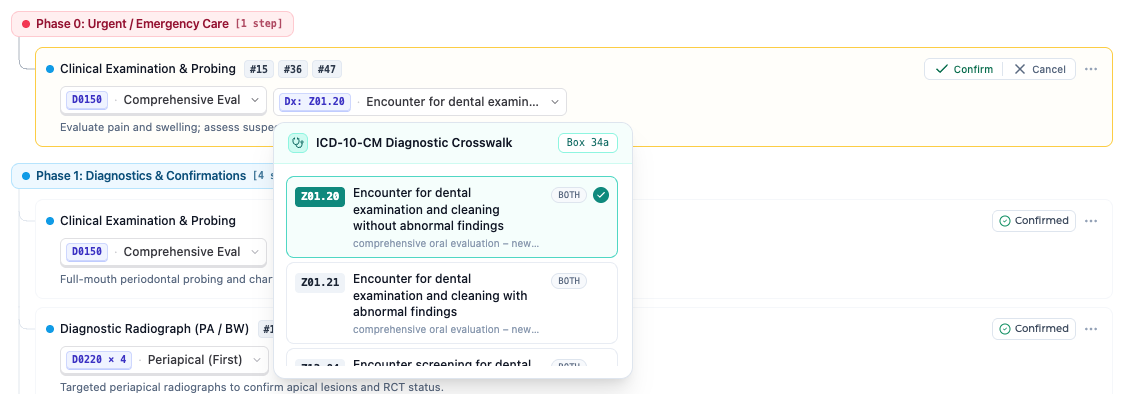
A treatment plan is only truly actionable for the clinic if it bridges clinical diagnosis and back-office billing: ICD-10 diagnostic codes (the clinical “Why”) and standardized CDT procedure codes (the procedural “What”).
Rather than outputting vague text descriptions that the front desk or Treatment Coordinator still has to manually cross-reference in a codebook, our workflow automatically maps every radiographic finding to its justified ICD-10 diagnosis code and corresponding CDT procedure sequence:
Because both the ICD-10 diagnostic justification and CDT procedure codes are mapped at the moment of synthesis, the clinic gets audit-ready billing and medical/dental claim accuracy for the back office alongside visual, plain-English procedure cards for the patient at the exact same time.
AI Drafts, The Dentist Decides—And the Treatment Coordinator Closes
Let’s be crystal clear about a clinical principle we hold sacred at OriginTechX: AI cannot and should not replace the dentist’s clinical judgment.
An algorithm does not hold the handpiece, does not feel tactile bone density during osteotomy, and does not know a patient’s personal financial priorities or dental anxiety levels. When an AI tries to act as an autonomous prescriber, it destroys clinical trust.
Instead, the breakthrough lies in Doctor-in-the-Loop Treatment Synthesis—turning a messy 15-minute chairside bottleneck into a seamless 60-second handoff between the doctor and the Treatment Coordinator:
- AI Generates the Baseline Treatment Draft: Instead of forcing the dentist to start with a blank A4 sheet or an empty screen, the engine synthesizes the detected dental conditions and automatically drafts sequenced treatment options (e.g., Surgical Phase, Healing Phase, Restorative Phase).
- Dentist Verification & 10-Second Customization: The doctor reviews the draft with full clinical authority—tailoring the clinical approach to the patient’s dental history and budget by toggling between modalities (such as All-on-4 vs. individual implants vs. bridge or denture options) or swapping material choices with a single click.
- One-Click Import to Solution Studio: No more writing cryptic notes on sticky paper or shouting instructions down the hallway to the front desk. One click imports the doctor-verified plan directly into Solution Studio.
- Instant Treatment Coordinator (TC) Handoff: Whether the clinic has a dedicated TC or the doctor presents chairside, Solution Studio immediately renders the visual clinical roadmap, plain-English procedure explanations, and Plan A vs. Plan B fee breakdowns ready for patient sign-off.
Inside the Live Workflow: Watch It in Action
Here is what the complete flow looks like in practice—from radiographic detection and AI treatment drafting to doctor verification and 1-click import into Solution Studio:
How the Workflow Evolves: Three Eras of Treatment Planning
When you connect AI-driven treatment synthesis with Solution Studio, a consultation process that used to take 15 minutes of handwriting and photocopying condenses into under 60 seconds:
| Workflow Stage | The Old Way (A4 Panoramic + Pens) | Manual Digital Canvas | AI-Driven + Solution Studio |
|---|---|---|---|
| 1. Initial Plan Creation | Doctor hand-draws teeth and writes procedures on A4 copy | Doctor manually drags and drops every step from scratch | AI auto-generates the draft treatment plan in seconds |
| 2. Clinical Customization | Cross out with pen or rewrite in margins | Manually edit nodes and material cards | Dentist verifies & toggles options (Implant vs. Bridge) in clicks |
| 3. ICD-10 & CDT Mapping | Front desk manually looks up ICD-10 / CDT codes & fees | Manually search and attach procedure items | Auto-mapped ICD-10 diagnoses + CDT codes + visual patient cards |
| 4. Doctor-to-TC Handoff | Verbal hallway instructions + paper sheet | Manual save & workspace handoff | 1-click instant import into Solution Studio |
| 5. Signature & Archive | Physical signature + run to the office photocopier | Digital sign-off & cloud archive | Instant digital delivery to patient + permanent clinic sync |
From Concept to Chairside Reality
We built this AI-Treatment to Solution Studio pipeline in our lab because we believe dental software should finally respect a doctor’s time.
A dentist shouldn’t have to spend 15 minutes acting as a graphic designer with four colored pens on an A4 panoramic, nor should a Treatment Coordinator have to decode hurried handwriting to help a patient say “yes” to the care they need.
By combining a clinical engine trained on 20,000+ annotated radiographs with Doctor-in-the-Loop verification and one-click Solution Studio handoff, clinics get the best of both worlds: effortless speed for the doctor, a high-converting visual consultation for the Treatment Coordinator, and a crystal-clear roadmap the patient can truly trust.
Drag to turn · press the red button on the desk
Founder at OriginTechX